
Perhaps the single most misunderstood metric in podcasting is what Apple Podcasts calls "plays."
Many podcasters believe Apple Podcasts plays are equivalent to Spotify plays or YouTube views.
They aren't.
Apple Podcasts Connect defines play count as the "total number of times people pressed play on your episode."
That's it: the number of clicks or taps of the play button. So, when an Apple Podcasts user plays an episode, then pauses it, then resumes it, then pauses it, then resumes it... they have contributed to that episode’s play count multiple times.
If this strikes you as an unusual way to measure podcast playback, you're not alone. During a recent episode of Podnews Weekly Review, James Cridland said Apple's ratio of listeners to plays "makes no sense whatsoever."
Indeed, much of what's confusing here stems from the relationship between Apple’s listeners and plays metrics. It's very common for Apple Podcasts Connect to report many more plays than listeners for a given episode. For example, look at this episode:
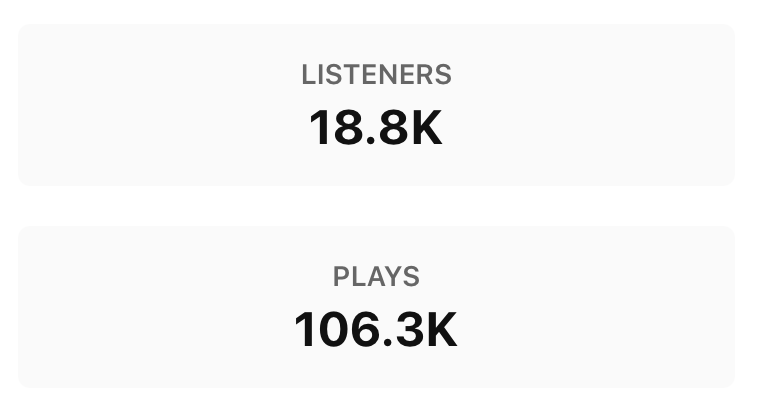
This seems odd, right? How can so few people generate so many plays?
Each listener, on average, generated 5.6 plays. Why so many? It’s likely because this episode is more than an hour long. And it includes multiple ad breaks. It seems entirely reasonable that many Apple Podcasts listeners each hit the play button several times during their time with this episode. Again, Apple plays are simply taps of the play button.
And if we look beyond a single example episode at a larger sample size, a larger pattern emerges.
Longer episodes get more plays
Generally speaking, the longer the episode, the greater the number of Apple Podcasts plays per listener.
I analyzed several thousand episodes in Apple Podcasts, ranging from very short to very long. I plotted each episode on a graph, showing both episode duration and average Apple Podcasts plays per episode:
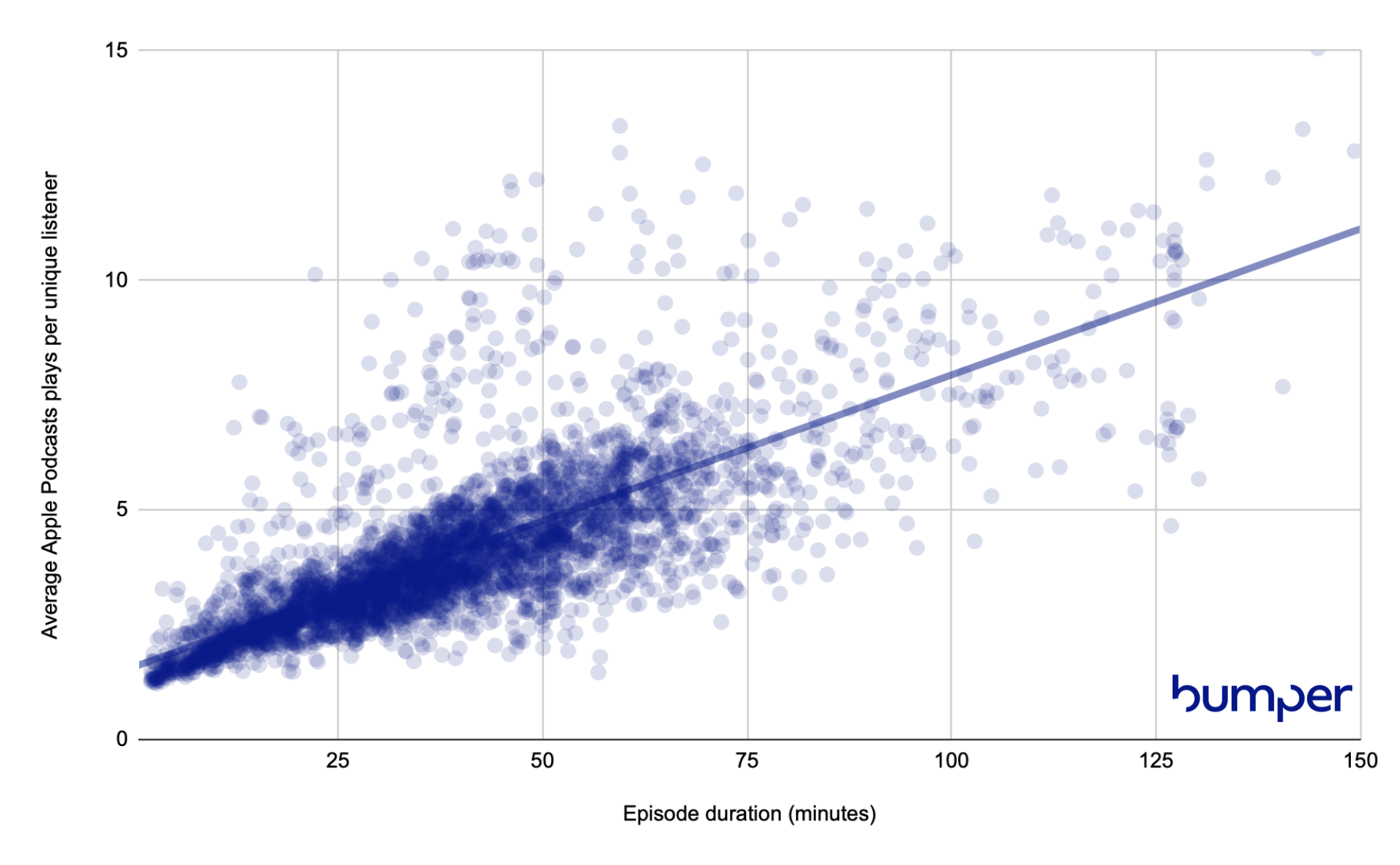
The relationship is clear. Episode length and Apple Podcasts plays are strongly correlated.
If for some reason, you want to increase your play count in Apple Podcasts Connect, there's a simple way to do that: make longer episodes. The longer the episode, the less likely it is to be consumed in a single uninterrupted playback session.
But that's silly, and I'd argue against trying to increase your Apple Podcasts play count. In fact, there's only one thing I suggest most podcasters do with their Apple Podcasts plays...
Ignore them
At Bumper, we advise our clients not to do anything with the play counts that appear in Apple Podcasts Connect.
Additionally, we strongly recommend against adding Apple Podcasts plays to Spotify plays and YouTube views. Such an aggregation is tempting, but very wrong.
Earlier this year, the Alliance for Measurement in Podcasting (AMP) ratified the AMP Accords, which calls for podcast platforms to adopt a common definition for play.
Perhaps Apple Podcasts will update their plays metric. I know many are hopeful. But what's a podcaster to do in the meantime?
At Bumper, we help podcasters make the best decisions they can with the data that’s actually available. That's why the Bumper Dashboard presents modeled Apple Podcasts playback, based on verified audience and retention data. It's not perfect (it's a model). But it's available today, and lets podcasters sum playback across platforms without inflation.
Remember
A single Apple Podcasts user can generate many plays on the same episode, one for every time they touch the play button.
Apple Podcasts plays are not equivalent to Spotify plays or YouTube views, and should not be summed with them
The AMP Accords recommend a common definition of play. Spotify has updated their plays metric to align with AMP's definition.
The Bumper Dashboard (including the free tier) offers a unified view of YouTube views, Spotify streams, and Apple Podcasts modeled playback at both the podcast and episode level.